Jasper Alblas
Jasper Alblas
Data Engineering • Analytics • Business Intelligence
Welcome to this walkthrough of the Introduction to SIEM Room on TryHackMe. If you have been following along with the SOC Level 1 Path, you have just finished learning about EDR, great job! Now it is time to learn about SIEMs, Security Information and Event Management systems.

Room URL:
https://tryhackme.com/room/introtosiem
I am making these walkthroughs to keep myself motivated to learn cyber security, and ensure that I remember the knowledge gained by these challenges on HTB and THM. Join me on learning cyber security. I will try and explain concepts as I go, to differentiate myself from other walkthroughs.
Now, let’s move on! This is going to be a long one!
SIEM stands for Security Information and Event Management system. It is a tool that collects data from various endpoints/network devices across the network, stores them at a centralized place, and performs correlation on them.In this room, we will learn how different devices in a network generate logs and why it’s essential to have a centralized solution to collect, normalize, and correlate these logs.
Nothing to explain here 🙂
Answer: Security Information and Event Management system
In a network with various components (e.g., Linux/Windows endpoints, a data server, and a website), each device generates logs. These logs help detect activities and potential threats.
Registry information is related to an endpoint, therefore it is host-centric.
Answer: host-centric
VPN information is all about communication over a network, therefore we are talking about network-centric information here.
Answer: network-centric
Answer: No answer needed
Every device on a network generates logs when activities occur—like website visits, SSH connections, or logins. These logs are essential for monitoring and detecting potential security threats.
/var/log/httpd: Web requests/responses and errors/var/log/cron: Cron job events/var/log/auth.log or /var/log/secure: Authentication logs/var/log/kern: Kernel-related events/var/log/apache or /var/log/httpd.To analyze and monitor logs effectively, SIEM tools collect them using different ingestion methods:
HTTP logs are stored at /var/log/httpd.
Answer:
/var/log/httpd
Correlation rules are logical expressions set by analysts to detect threats.
Examples of Correlation Rules:
Use Case 1: Log Deletion
If Log source is WinEventLog AND EventID is 104 → Trigger "Event Log Cleared"Use Case 2: Suspicious Command Execution
If Log Source is WinEventLog AND EventCode is 4688 AND NewProcessName contains "whoami" → Trigger "WHOAMI Command Detected"SOC Analysts use dashboards to monitor and investigate alerts:
The event that gets trigged when event logs get deleted is event ID 104.
Answer: 104
False positives! In case of these we would like to do some tuning of our rules to avoid similar False positives from occurring again. False positives could end up swamping us!
Answer: False Positive
Click on the View Site button below, which will display the lab on the right side of the screen.View Site
In the static lab attached, a sample dashboard and events are displayed. When a suspicious activity happens, an Alert is triggered, which means some events match the condition of some rule already configured. Complete the lab and answer the following questions.
View the static site. Start by pressing the Start Suspicious Activity button.

A process will start blinking in red:

The process is called cudominer.exe.
Answer: cudominer.exe
Click the process, and you will enter a event log. We now need to find the user which was responsible for executing the cudominer process.
On the fourth row you will see the cudominer process. There is also a UserName column, and in it you will see that the user who executed the process is Chris. Look at the last row:
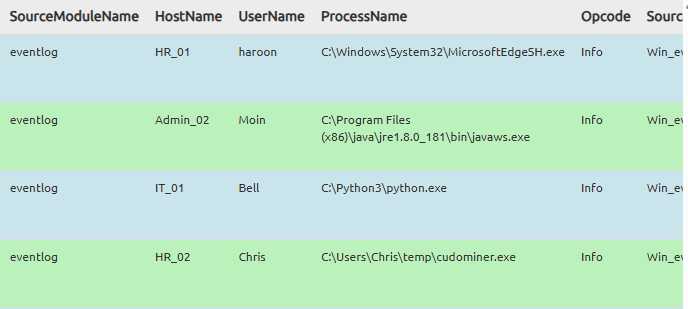
Answer: Chris
Next to the UserName is the HostName. The user’s hostname is HR_02.
Answer: HR_02
Click the event row, and now you get shown the Rule that triggered the event.

You can see that the rule checks is the process name includes miner or crypt. In this case, with the process called cudominer, the term that matched the rule is miner.
Answer: miner
Press the Go to Analysis / Action button and you get presented with an action window. We need to confirm if the rule is a true-positive or false-positive.

The process is definitely sounds like some kind of crypto mining process, so let’s mark it as a true positive.
Answer: True-Positive
We get shown a flag, YAY!
Answer: THM{000_SIEM_INTRO}
In this room, we have covered what SIEM is, its capabilities, and what visibility it provides. Explore the following rooms and challenges to learn in-depth about how Incidents are investigated.
Answer: No answer needed.

Congratulations on completing Introduction to SIEM. This room was a great, but very basic, introduction to SIEM. Let’s keep on moving!
Come back soon for more walkthroughs of rooms on TryHackMe and HackTheBox, and other Cybersecurity discussions.
Find my other walkthroughs here.
You are welcome to comment on this post, or share my post with friends.I would be even more grateful if you support me by buying me a cup of coffee:

I learned a lot through HackTheBox’s Academy. If you want to sign up, you can get extra cubes, and support me in the process, if you use the following link:





[…] Introduction to SIEM […]
Great overview of how SIEM transforms raw security logs into actionable threat intelligence. Features like centralized log collection, event correlation, and real-time alerting are exactly what modern security teams need. Solutions like ZPOA’s SIEM & Threat Detection help organizations gain complete visibility across their environments while accelerating threat detection and incident response.
Thanks
Zpoa – SIEM