Jasper Alblas
Jasper Alblas
Mastering Data & Cybersec
Welcome to this walkthrough of the KaffeSec – SoMeSINT Room on TryHackMe. I have been doing a lot of geolocation challenges lately, and I thought I could try another area of OSINT this time – Social Media Intelligence. Let’s cover this room together in which we cover an intro to SOCMINT (Social Media Intelligence/Investigation) techniques and tooling. We will use our awesome OSINT skills to perform an online investigation of a mysterious husband!

Room URL:
https://tryhackme.com/room/somesint
I am making these walkthroughs to keep myself motivated to learn cyber security, and ensure that I remember the knowledge gained by these challenges on HTB and THM. Join me on learning cyber security. I will try and explain concepts as I go, to differentiate myself from other walkthroughs.
In this room, you will be learning social media analysis and forensics. You will learn about google dorking, website archiving, social media enumeration/analysis, and the basic usage of OSINT techniques in the context of social media investigation. You don’t need any previous knowledge of OSINT to do well in this room, but it definitely helps. I have included some resources in the ” Resources ” task at the bottom of the room that I encourage you to check out after completing this room!
When you have completed this room, you should be comfortable applying tools and methodologies to gather information through social media, and answer context-based questions concerning social media. The goal of this room is to prepare you for CTF challenges in this category, as well as real-world research. All tools in this room are optional, as you could technically get all of the information you need through a web browser and methodologies; however, the tools mentioned will make this room much more beginner-friendly.
Sometimes, you will come across a question that requires a flag format.
The format for this room’s flags is ks{flag} . Flags are not case-sensitive but must be spelt right (copy/paste).
At any point along the way, you can ask for help in the TryHackMe Discord (in the #room-help channel).
Any and all feedback is also welcome in the KaffeeSec discord server.
Answer: No answer needed
You are Aleks Juulut, a private eye based out of Greenland. You don’t usually work digitally, but have recently discovered OSINT techniques to make that aspect of your job much easier. You were recently hired by a mysterious person under the moniker “H” to investigate a suspected cheater, named Thomas Straussman.
After a brief phone-call with his wife, Francesca Hodgerint, you’ve learned that he’s been acting suspicious lately, but she isn’t sure exactly what he could be doing wrong. She wants you to investigate him and report back anything you find. Unfortunately, you’re out of the country on a family emergency and cannot get back to Greenland to meet the deadline of the investigation, so you’re going to have to do all of it digitally. Good luck!
The person who hired us goes under the moniker H.
Answer: ks{H}
We are investigating Thomas Straussman.
Answer: ks{thomas straussman}
How exciting! Through talking to people who know Thomas, you’ve found out that he has a very guessable online handle: tstraussman. With this handle, we can find his social media accounts, and start off this room.
The overall process for finding information from social media accounts starts with finding the social media accounts themselves. Finding social media accounts from names or emails can be automated through a process called enumeration. This is usually done with CLI tools or scripts, but you can get similar effects with Google dorking. Here is a room on Google dorking; it’s great reading material before you attempt this task and also includes a cheat sheet that comes in handy.
Disclaimer: Before starting, I will preface this by saying the only places these accounts are found on are Twitter and Reddit. Please do not try to investigate further out-of-scope, as you will both meet a dead end and be snooping on accounts not involved with this CTF at all. I am not responsible for any actions/interactions made with an account outside of the sockpuppets created for this CTF. As a general rule, we’re collecting PASSIVE information – there’s no interacting directly with these accounts.
Alright, let’s get going! We know we are looking for a X account and a Reddit account belonging totstraussman.
A very quick google search leads us to the following accounts:
https://www.reddit.com/user/Tstraussman
and:
https://twitter.com/tstraussman
Well that wasn’t hard!
Now to find Thomas’ favorite holiday. A quick look on his X profile gives us the answer:
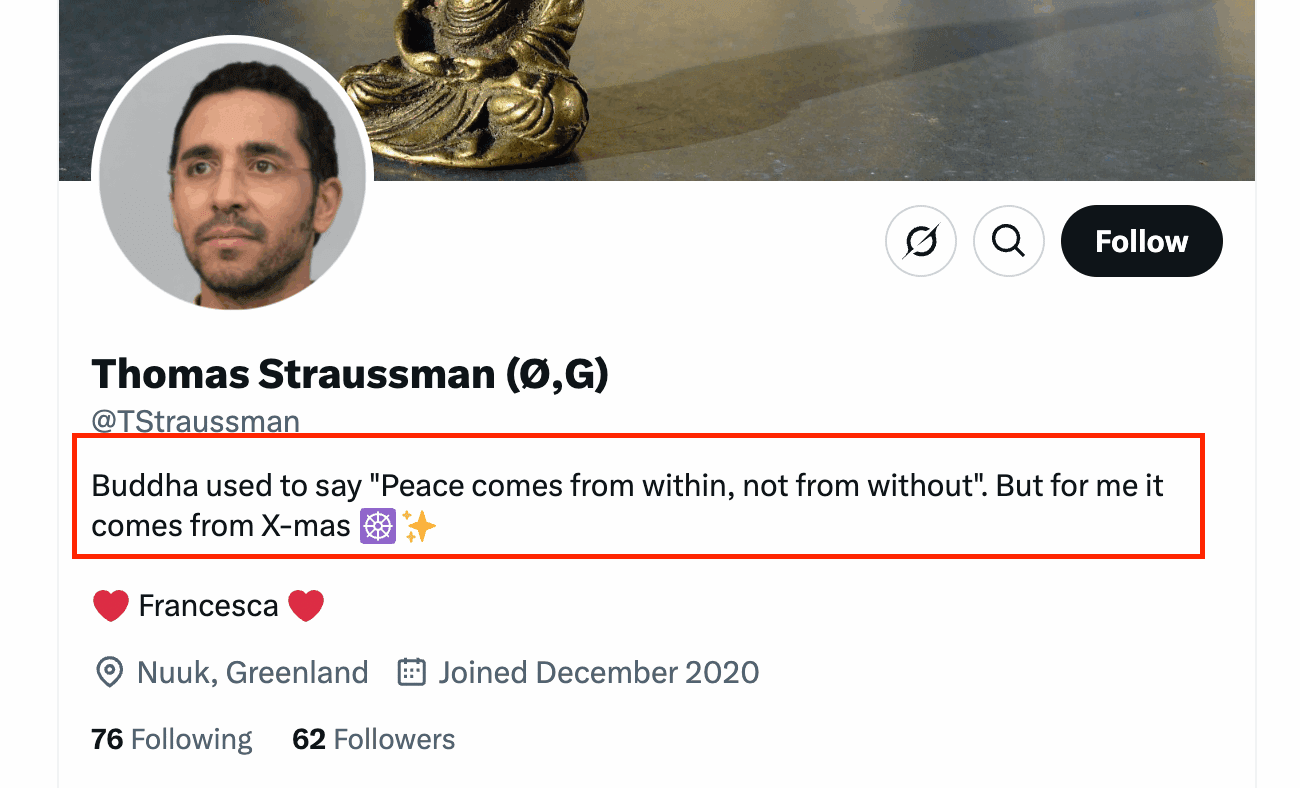
Thomas seems to like Christmas! THM doesn’t expect the flag format ({ks}) they taught us before. I don’t know why, but the answer is simply Christmas!
Answer: Christmas
I continued looking at Thomas’ X profile and tweets, but could not find any information on this birth date. Let’s take a look at Reddit. Here we see that Thomas has posted one message on Reddit:
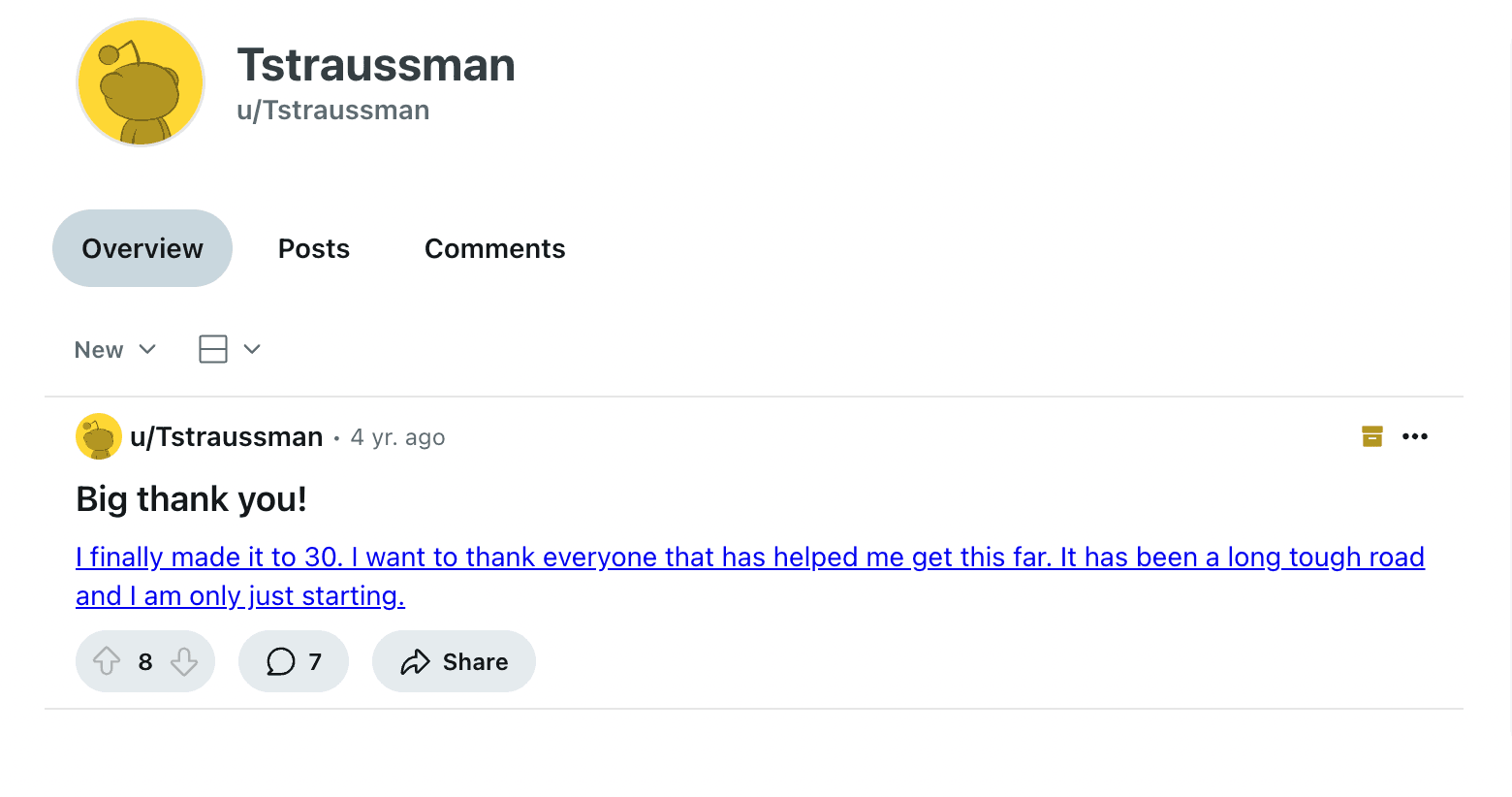
Interesting. In this four year old post he mentions that he turned 30. This only says “4 yr. ago”. But if you hover over this message you get the precise date and time:
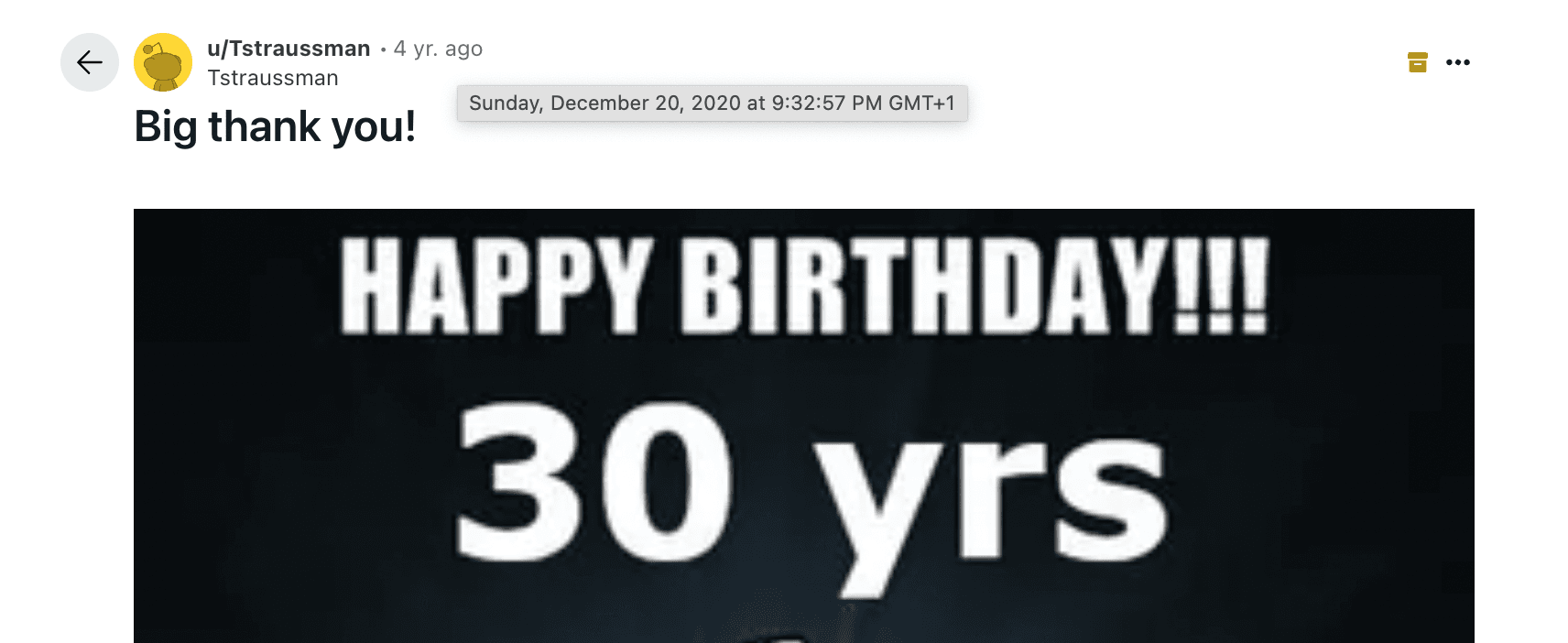
We can assume his birthday to be December 20, 1990.
Answer: 12-20-1990
According to Thomas’ X profile, he is in love with a girl with the name Francesca. Let’s assume this is his financee 😀
But looking for his X posts shows us no hints. But wait, maybe a reply can lead us in the right direction? Sure enough, I found this reply of Thomas on a post of a certain Francesca Hodgelink:
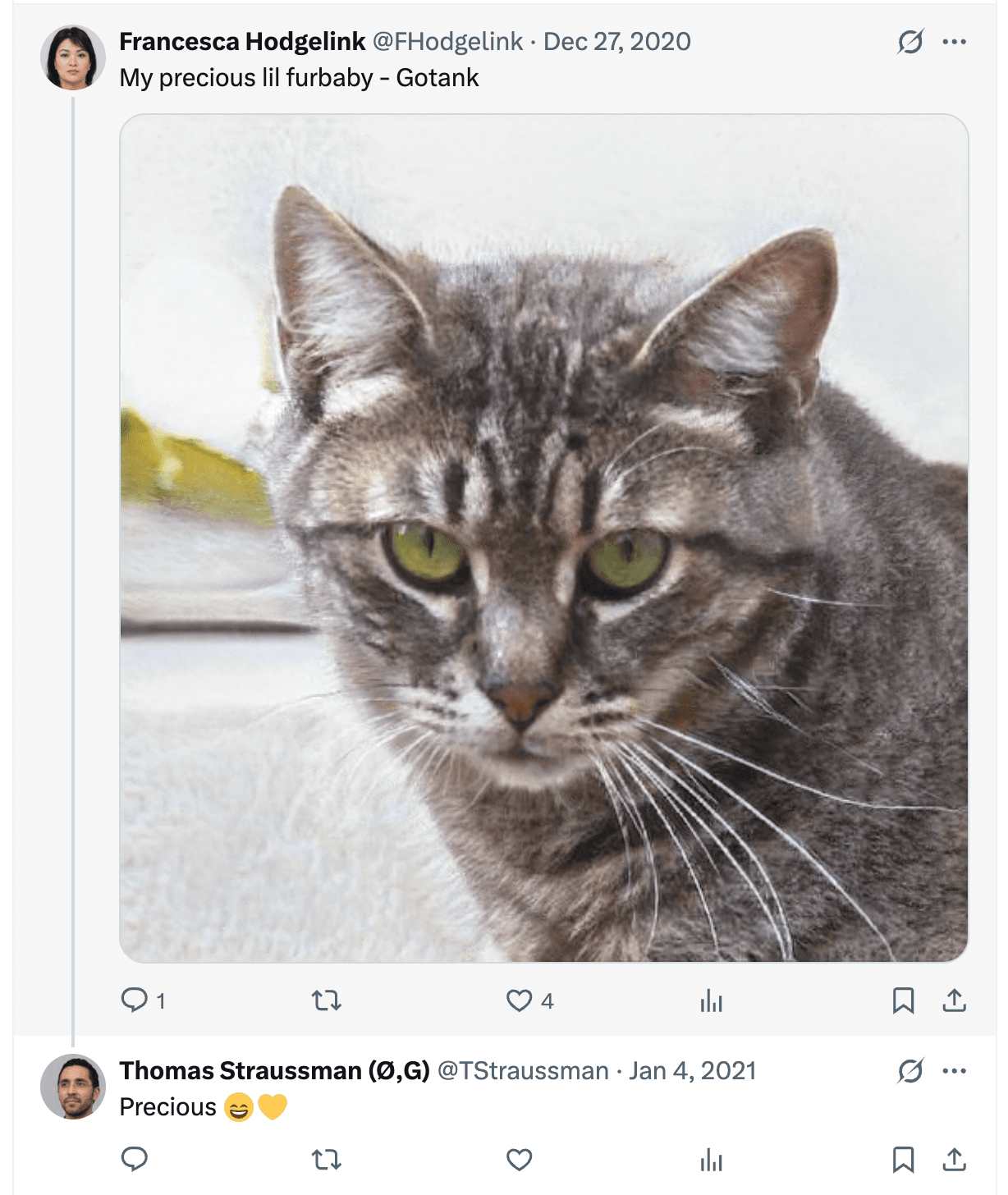
She shares the right name. Let’s just check out her profile before concluding anything. On her X profile it says: Happily engaged, unhappily hungry all the time.
Another hint that this might be Thomas’ fiancee. Finally there is this post:
I think we can assume it is her 🙂 Her X/Twitter handle is @FHodgelink.
Answer: @FHodgelink
Well, this is an easy one! Simply find the picture on the top of his X profile:
https://twitter.com/TStraussman/header_photo
Clearly, a buddha statue.
Answer: Buddha
First things first, make sure that you’ve downloaded the latest version of Python 3 . Then follow this guide to install the latest version of Spiderfoot (currently v3.3).
Once it’s installed correctly, run it by typing python3 sf.py -l 127.0.0.1:5001.
You can access the web interface by navigating to localhost:5001 in your browser.
Click on “New Scan”. In the “Scan Target” field, type in “Thomas Straussman” or “tstraussman”; then, under By Use Case, ensure that you checked the All option. Finally, press run.
Looking at the results, you can figure out which are false positives by filtering out anything that isn’t related to Reddit or Twitter.
If you find a Twitter account that leads to shadowban.eu, click on the link.
If you can’t find anything related to Twitter, go to Settings --> Account Finder and set the highlighted option to False.
After checking to see if the account exists, you can search their username on twitter (or go to twitter.com/[username]).
SpiderFoot seems to be a dead project! I have tried installing it on both Mac OS, Linux and Windows and couldn’t get it to work. I will give you the answer for free. We don’t need SpiderFoot to continue with this room.
Answer: sfp_accounts
Answer: ks{1346173539712380929}
Now that you have Thomas’ Reddit and Twitter accounts, you can do some cool stuff!
At this point, consider downloading a reverse search extension for your browser, my favorite is RevEye, which lets you choose from a handful of great reverse search engines, or use all of them simultaneously.
There are a few key types of information that we want to find from socials:
Since you have gotten most useful information from Thomas’ Twitter, it’s time to “pivot” to his fiancee’s account.
What personal information can you find?
NOTE: If you get stuck on the first flag, consider two things:
Let’s keep looking at Francesca’s X account:
There is one Tweet mentioning a holiday:
We could reverse image search this image and probably get the result, but the image tag has a very revealing alt value:

This is a photo from Koblenz, Germany.
Answer: Koblenz, Germany
This one is easy. I found this Tweet:
We can see this was posted on the 25th of December so this must be her mothers name.
Answer: December 25th
Another easy one:
Answer: Gotank
Another useful Tweet:
Answer: 90 Day Fiancee
Now that we’ve gathered intel from Thomas and Francesca’s Twitters, lets move to another platform – Reddit.
For the sake of this investigation, we’re going to be using Reddit in two different ways:
First, you’re going to want to install the WayBackMachine extension for your browser (you don’t need it, but it’ll make your life much easier).
Using Reddit’s old site, navigate to Thomas’ profile. Right click anywhere on the page and click on Wayback machine –> All Versions. You will see a calendar that shows all of the saved versions of the site, click through and take a look at each saved version (in this case there should be none).
So it hasn’t been saved yet… Nothing out of the ordinary, right?
Next, go to Thomas’ birthday post. Repeat the steps to find the first version of the site and….. Voila!
We’ve discovered a coworker, which is another source of intel for us! But the question is… how much intel?
Download the Wayback machine plugin and visit the birthday post on the old Reddit:
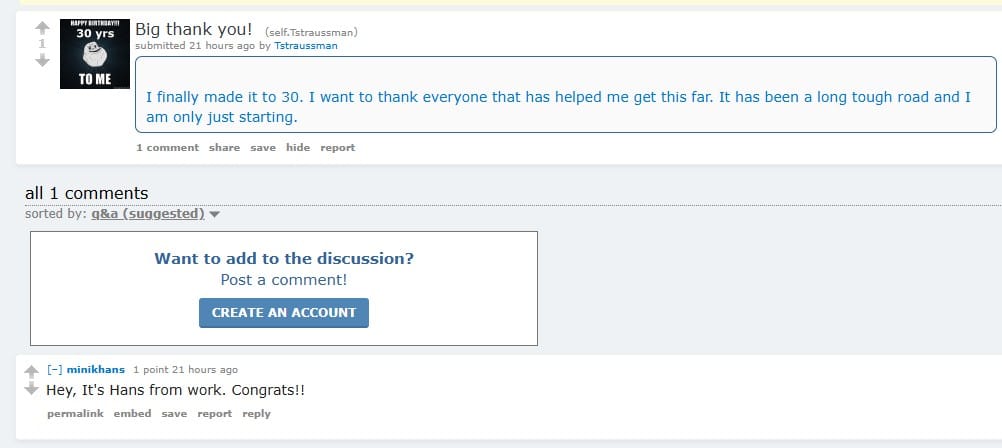
A deleted message from Hans shows up!
Hans sounds like a first name, so maybe Minik is his last name? Yes!
Answer: Hans Minik
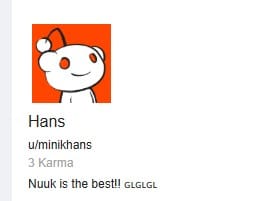
If you visit Hans’ profile you see the following message:
https://www.reddit.com/user/minikhans
Nuuk is the best!! 🇬🇱🇬🇱🇬🇱
And then there is this post:

We can assume he lives in Nuuk! There are not many other large towns in Greenland.
Answer: Nuuk, Greenland
There are two messages we can find is we use the Wayback Machine plugin to look at Hans’ reddit page. The first one is this one, found in March 2021:
https://web.archive.org/web/20210323231748/https://old.reddit.com/user/minikhans/
A link is posted by Hans:
https://web.archive.org/web/20210323231456/https://ghostbin.com/paste/ww4ju
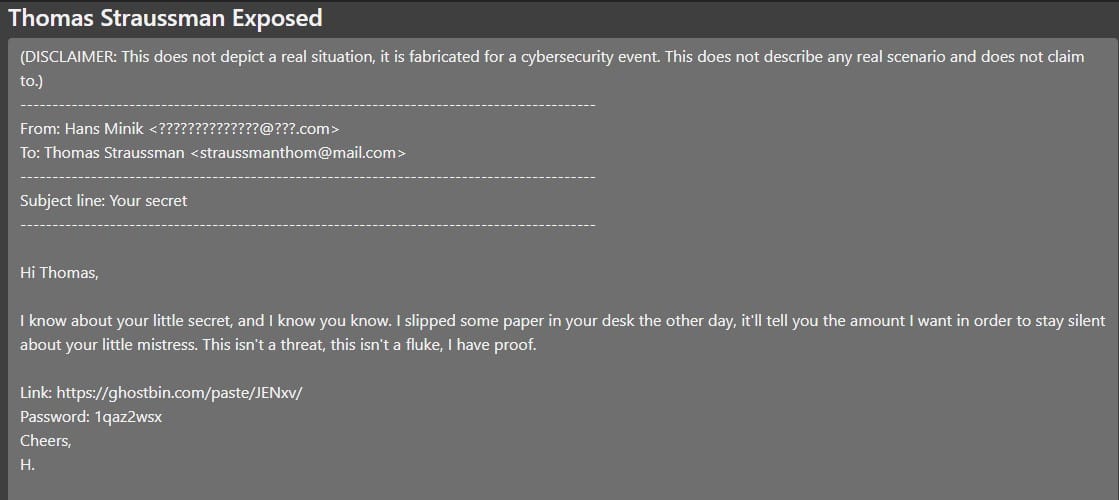
The paste ID is the last part of the ghostbin link.
Answer: ks{ww4ju}
If we go all the way back on Hans’ Reddit profile we find another new (well, old!) message popping up:
Here Hans posts a link:
We also need to visit this with the Wayback machine plugin active:
https://web.archive.org/web/20210104152252/https://pastebin.com/szcELGMY
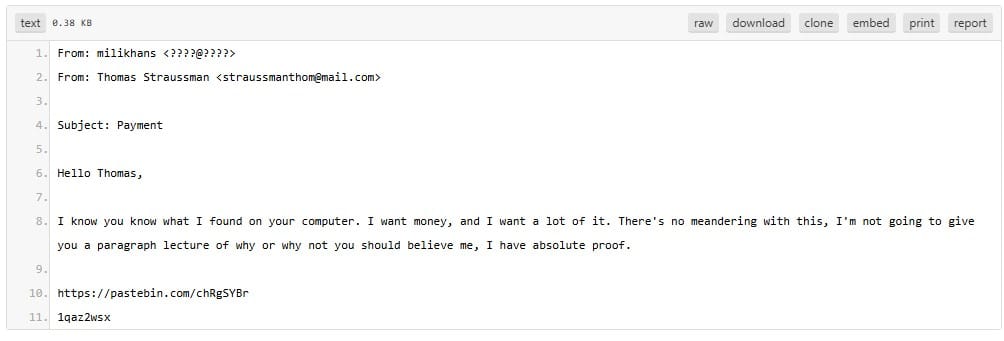
This time we have to submit the password mentioned last.
Answer: ks{1qaz2wsx}
Time to follow the previous link we found:
Paste the password (1qaz2wsx).
We find the following message:
From: Thomas Straussman <straussmanthom@mail.com>
To: Emilia Moller <molemi@????.???>

Subject: Our little secret :)

I know that you're concerned with me being engaged and all, but I'm fully committed and willing to be with you for as long as you want or need. You need to know that I love you, and I'm prepared to sacrifice an arm and a leg to be with you.

Love, Thom.Answer: Emilia Moller
This is simply shown in the above message.
Answer: straussmanthom@mail.com
Congrats on making it here! Below are a few resources that I encourage you to try after completing this room:
Other TryHackMe Rooms:
Fancy some more challenges? Check out these CTFs:
Answer: No answer needed
Answer: No answer needed
Congratulations on completing KaffeeSec – SoMeSINT! This was a fun little room. It was a bit annoying that Spiderfoot didn’t work, but I hope you learned a bit about how much info people can leave behind on Social Media. Be careful out there 🙂
Come back soon for more walkthroughs of rooms on TryHackMe and HackTheBox, and other Cybersecurity discussions.
Find my other walkthroughs here.
You are welcome to comment on this post, or share my post with friends.I would be even more grateful if you support me by buying me a cup of coffee:

I learned a lot through HackTheBox’s Academy. If you want to sign up, you can get extra cubes, and support me in the process, if you use the following link: